PDF ProX: PDF Reader & Editor
- 3.2
- Rating
- 10.00M
- Installs
- Free
- Price
 Analysis by App-foxy
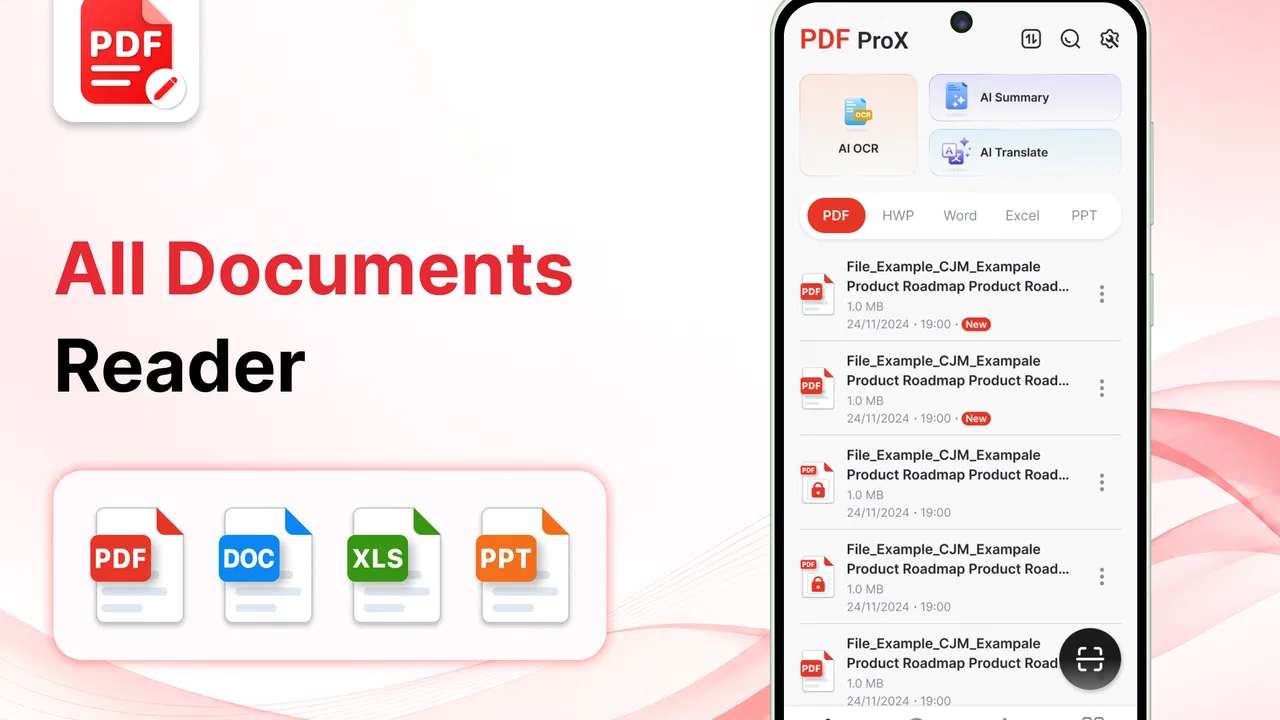
Reading a PDF on a phone sounds simple until the file arrives at the wrong moment: during a commute, between meetings, or while someone is waiting for a document to open before a decision can be made. PDF Reader, All PDF Viewer is built for that everyday problem. It is a free productivity app from Office Suite Pro that focuses on opening, annotating, and organizing PDF files rather than trying to become a complete office suite. After spending time with it, I see its main appeal clearly: it gives people a practical place to handle PDFs on a mobile screen without making the task feel like a desktop chore.
The app has a 4.3 average from around 16 thousand ratings and has passed 10 million installs, which puts it among the more familiar choices in this space. It is rated for Everyone, runs on Android 8.0 and later, and the current version is 1.7.2-Office. Those details matter because PDF tools are often used on older phones that remain perfectly good for reading documents. I would not describe this as a replacement for a full desktop document workflow, but it is a sensible companion for anyone who regularly receives forms, manuals, receipts, schedules, or work documents by phone.
How PDF Reader feels when connectivity is part of the task
I find the most reliable way to use a mobile PDF reader is to separate the network step from the reading step: first make sure the file has arrived, then open it and decide what needs attention. That distinction is especially helpful when an attachment is shared through a messaging or cloud app, where a preview can appear before the full document is ready. From there, I focus on keeping the handoff clear, so an annotated copy does not get confused with the original.
You May Also Like

 Pandora - Music & Podcasts
Pandora’s Music Is Easy to Start, but Harder to Recover
Pandora’s strength is its low-effort path from a seed to a station. Its weak spot is how much confidence it asks you to place in connection, setup, and quiet recovery.

 8 Ball Pool
 Is Built on Rivalries, Rematches, and Routine
A close look at the rivalries, rematches, shared routines, and unanswered safety questions that turn a quick pool match into a persistent mobile community.

 Samsung Music
’s Quiet Strength Is Playing What You Already Own
Its reach comes less from spectacle than from dependable access to a personal library. That simplicity is both the app’s strongest retention engine and its ceiling.

 AccuWeather: Weather Radar
AccuWeather Review: A Quick, Clear Forecast for Everyday Decisions
For everyday plans, the best forecast is the one you can understand quickly. AccuWeather makes rain timing, radar, and local conditions easy to act on, with a few trade-offs.

 Hill Climb Racing
Why Hill Climb Racing Still Turns Crashes Into One More Run
A tiny car, a bumpy hill and one more upgrade: Hill Climb Racing keeps resurfacing because its simple chaos makes every near-miss feel personal.

 AliExpress - Shopping App
AliExpress Makes Global Shopping Feel Personal, but Shoppers Bear the Risk
AliExpress turns a global marketplace into a pocket-sized discovery engine. Its reach is useful, its shopping loop compelling, and its trade-offs easy to miss.
More From Our News Desk
View All News


Opening a document is only one part of the experience
My first useful distinction with this app is between handling a PDF and obtaining one. Once a file is available on the device, the reader’s job is straightforward: open it, move through pages, inspect the text, and use annotation tools when needed. The more interesting question is what happens around that file. Many real PDF sessions begin in another app, such as email, cloud storage, a messaging service, or a browser. The quality of the experience therefore depends partly on how smoothly the document reaches the viewer.
I would treat PDF Reader as the place where I work on a document after it has arrived, not as a complete answer to every connectivity problem. If a file is still loading from an online source, the network connection belongs to that source and the sending app. If a document is already stored locally, opening it is a different kind of task. Keeping those two situations separate helps avoid frustration: a slow download is not necessarily a reader problem, while a difficult-to-find local file is something an organizer should make easier.
This is especially relevant when someone sends several versions of the same document. A mobile reader can display the latest file, but the user still has to decide which copy is current and where the finished annotation should go. My practical advice is to establish a simple habit: open the attachment in the viewer, check the document title and first page, then annotate only after confirming that it is the correct version. That small pause prevents the common mistake of marking an outdated form or reviewing the wrong draft.
Annotation is more useful when the connection is not the focus
The annotation function is the feature that gives this app more purpose than a basic browser preview. I find it most useful for short, deliberate actions: marking a clause to revisit, drawing attention to a figure, or adding a note before replying to the sender. On a phone, this works best when I am not trying to perform a complete editorial review. The screen is too small for constant precision work, so I use annotations to capture decisions and questions rather than to redesign a document.
A good mobile workflow is to read once without marking anything, then return to the relevant pages and annotate only the points that need action. This reduces clutter and makes the final document easier for someone else to understand. It also limits the time spent zooming and panning, which is where phone-based PDF work can become tiring. The strongest use of the app is focused document handling, not replacing a large-screen editing setup.
Connectivity changes the meaning of an annotation, too. A note made while reviewing a document may need to be sent back through email or another service later. I would therefore avoid treating the annotation as the end of the workflow. After marking a file, I check that the changes are visible and then make sure I know where the edited copy is stored before closing the app. This is a simple recovery-minded habit, especially when the original document came from a temporary conversation or an online folder.
Mobile situations where the app makes sense
PDF Reader fits naturally into short mobile sessions. I can imagine using it while checking a rental document before a viewing, reviewing a travel confirmation, reading a product manual beside the item it describes, or marking a work brief before a call. These tasks share three characteristics: the document matters, the session is relatively focused, and carrying a laptop would be inconvenient.
It is also useful for people who keep several kinds of documents on one phone. A student may need to move between reading material and submission instructions. A freelancer may review a client brief, a statement, and an approval form in the same afternoon. A family member may simply want one dependable viewer for bills, instructions, and official paperwork. The organizing side of the app becomes more valuable as these small tasks accumulate, because searching through a general downloads folder is rarely pleasant.
However, I would not choose a phone viewer for a long contract review or a document that requires constant side-by-side comparison. That kind of work benefits from a bigger display, a physical keyboard, and a broader file-management environment. The app can still be a convenient inspection tool in those cases, but it is not the most comfortable primary workspace. Knowing that boundary is important: a good mobile companion does not need to pretend it is a desktop workstation.
When the network fails at an inconvenient moment
Connectivity problems are most annoying when they appear after the user has already committed to a task. A document may be attached to a message that has not finished downloading, or a cloud location may take time to respond. In that situation, repeatedly tapping the viewer usually does not solve the underlying issue. I get better results by returning to the source app, checking whether the file has arrived, and then opening it again in PDF Reader.
Once a file is visible, I recommend checking a few pages before starting detailed annotations. If only a preview is available, the document may not yet be ready for serious work. This is one of the less obvious lessons of mobile PDF use: the first page appearing on screen does not always mean the entire workflow is ready. Confirming the file before marking it saves time and reduces the chance of building work on an incomplete transfer.
Recovery also matters after an interruption. If a call, notification, or weak connection breaks the session, I reopen the document and revisit the last page I remember working on rather than assuming every change was completed. For important files, I make a small note outside the document about what still needs attention. That may sound excessive, but it is useful when a PDF review happens in several short sessions rather than one uninterrupted sitting.
The app’s organizing purpose helps here because a known document location is easier to return to than an attachment buried in a conversation. I would still keep important originals separate from working copies. One folder or naming pattern for untouched files and another for annotated versions makes recovery clearer, particularly when the same PDF is sent more than once. This is not glamorous, but it is the kind of workflow detail that determines whether a document app saves time or creates another layer of confusion.
Being careful with data and storage habits
A data-conscious approach starts before opening the file. Large PDFs, image-heavy scans, and documents received through mobile services can consume more data than a user expects. When I am on a limited connection, I prefer to wait until the document is already available on the device before reading it closely. I also avoid repeatedly reopening the same attachment from a messaging thread when a local copy will do.
Organization has a second benefit beyond convenience: it reduces unnecessary transfers. If I can identify an existing copy of a document, I do not need to download another one simply because the sender has shared it again. The app’s document-management focus makes this habit easier to maintain than relying on a browser’s temporary viewing screen. It is a small difference, but it becomes meaningful for people who handle many files during the month.
There is also a privacy-minded reason to separate viewing from sharing. A PDF may contain an address, account information, medical details, or internal work notes. I take a moment to confirm the recipient and the intended version before sending an annotated file onward. The reader can help me prepare the document, but the final sharing decision still belongs to me. That distinction is worth remembering because convenience can make it easy to pass along a file before checking what has been added to it.
Users should also think about whether they need annotation at all. If the task is simply reading a public manual, a lightweight preview may be enough. If the file contains sensitive information, I would be more deliberate about where it came from, where the edited copy is kept, and which app handles the final share. PDF Reader is useful in that chain, but no viewer removes the need for sensible file hygiene.
What the free model means in practice
The app is free to install, which makes it easy to try for occasional PDF reading without committing to a subscription at the start. There are in-app purchases priced from $19.99 to $29.99 per item, so anyone who expects to use it heavily should pay attention to which tools or upgrades are presented during use. I would not assume that every advanced workflow is included in the free experience, and I would decide based on actual needs rather than unlocking features simply because they appear on screen.
For me, the free entry point is most attractive to people who need a reliable reader and occasional annotation. A professional who handles PDFs every day may find value in paid capabilities, but should compare the total cost with a desktop office suite or another specialized PDF editor. The right choice depends on whether mobile convenience is the main priority. If most work happens on a computer, paying for a phone-centered tool may not improve the overall process enough to justify it.
The developer, Office Suite Pro, has positioned this as a focused productivity tool rather than a niche reader for one particular profession. That broad approach explains why it can suit students, office workers, households, and independent workers alike. It also means the app must be judged by practical flexibility instead of expecting deep specialist controls for legal review, design proofing, or document production.
Where it beats ordinary alternatives, and where it does not
The usual alternative is to open a PDF inside a browser, email client, or cloud-storage app. That is fine for a quick glance, but it can become inconvenient when I need to return to the same document, annotate it, or keep several files organized. PDF Reader has a clearer identity in those situations because it treats the PDF as the main object rather than as a temporary attachment.
Another alternative is a full office suite. That route is stronger when the work involves creating documents, editing spreadsheets, collaborating extensively, or switching between several file formats. PDF Reader is more focused, which can be an advantage when I only want to read and mark PDFs without navigating a large collection of unrelated tools. The trade-off is that I may still need another app for tasks beyond the PDF itself.
Dedicated desktop PDF software remains better for precision. A large screen makes page comparison easier, and a keyboard and mouse are more comfortable for lengthy annotation sessions. I see the mobile app as the better option when speed, portability, and a short review matter more than maximum control. If a user regularly prepares complex documents for formal delivery, I would recommend keeping a desktop tool in the workflow and using this app for travel, inspection, and quick feedback.
A realistic day with the viewer
Imagine receiving a multi-page work brief while away from your desk. The message arrives through an online service, so the first step is waiting for the attachment to become available. I would open it in PDF Reader, skim the opening pages, and verify the project name before reading closely. As I find questions, I would add brief annotations rather than trying to rewrite the brief on a phone.
Later, if connectivity becomes unreliable, the useful part of the workflow is having a clear place to return to. I would reopen the document from the organized file area, check the last page reviewed, and continue with the remaining questions. Before sending anything, I would inspect the annotated copy and confirm that I am not sharing the untouched original by mistake. This example shows why the app’s value is not just page rendering; it is the combination of reading, marking, and managing the document through several small moments.
For a student, the same pattern could apply to a study handout. For a household, it could involve a repair guide or an official form. In each case, the app is most helpful when the document needs more attention than a quick preview but less than a full desktop production session.
Who should use it and who should skip it
I would recommend PDF Reader to anyone who wants a dedicated Android tool for reading, annotating, and organizing PDFs, especially if documents arrive through several different apps. It is a good match for people who work in short bursts, travel often, or want a more deliberate alternative to opening every file in a browser. The Everyone age rating also makes its general-purpose positioning clear for households and mixed-age users.
I would be more cautious if your main requirement is advanced document editing, intensive collaboration, or highly precise page design. In those cases, a larger-screen PDF editor or a complete office environment may be the better primary choice. I would also skip it if you only open a PDF once every few months and already find your existing browser or file app perfectly adequate. Installing another viewer only helps when its organization and annotation workflow solve a real problem.
For older Android phones, the minimum requirement of Android 8.0 and later is reassuring, although the comfort of working with large or complex files will still depend on the device itself. A smaller screen, limited storage, or an unstable connection can make any PDF workflow less pleasant. I would start with the type of files you actually handle rather than judging the app from a single simple document.
My connectivity verdict
PDF Reader, All PDF Viewer works best when I treat it as a dependable mobile workspace for documents that have already reached the device. Its strengths are practical: a focused PDF experience, annotation for active reading, and organization that is more useful than a temporary attachment preview. The app does not eliminate the network steps around receiving and sharing files, so the smoothest results come from pairing it with a tidy storage habit and a quick check of each document’s status.
After using it, my recommendation is straightforward. Try it if you regularly need to inspect or mark PDFs away from a computer, and take advantage of the free starting point before deciding whether the in-app purchases suit your workflow. Keep a desktop alternative for demanding editing, and do not confuse a convenient viewer with a complete document-production system. For short, mobile PDF sessions where connectivity can interrupt the process, its real value is giving the file a clear place to be reviewed, annotated, and found again.
That makes it a useful productivity choice rather than an essential app for every phone. I would keep it installed if PDFs arrive often enough that browser previews feel limiting. If your document needs are rare or highly specialized, another option may be more sensible. For the middle ground—everyday reading, thoughtful markup, and organized access on Android—this app earns a place in the workflow.
FAQs for PDF ProX: PDF Reader & Editor
01What features does PDF Reader, All PDF Viewer offer?
PDF Reader, All PDF Viewer provides a comprehensive set of features including viewing, annotating, and editing PDF files. Users can highlight text, add comments, fill forms, and even sign documents digitally. The app also supports cloud integration, allowing easy access to documents from services like Google Drive and Dropbox.
02Is PDF Reader, All PDF Viewer compatible with all devices?
Yes, PDF Reader, All PDF Viewer is designed to be compatible with both Android and iOS devices. It offers a seamless experience across smartphones and tablets, ensuring that users can view and manage their PDF files on any device. Regular updates ensure compatibility with the latest operating system versions.
03Does PDF Reader, All PDF Viewer require an internet connection?
While an internet connection is not required for basic PDF viewing and editing, it is necessary for certain features like cloud storage access and downloading additional resources. Offline access is supported, making it convenient for users to view and edit documents without needing to be connected to the internet.
04Is there a cost associated with using PDF Reader, All PDF Viewer?
PDF Reader, All PDF Viewer offers a free version with basic functionality. However, to unlock advanced features such as enhanced editing tools and ad-free experience, users can opt for a premium subscription. This model allows users to choose the level of functionality that best suits their needs.
05How secure is PDF Reader, All PDF Viewer when handling sensitive documents?
Security is a top priority for PDF Reader, All PDF Viewer. The app supports password protection for sensitive documents and uses encryption to secure data during transfers. Additionally, no personal data is stored or shared without user consent, ensuring a high level of privacy and security.
Pros
- User-friendly interface for quick navigation.
- Supports a variety of file formats.
- Offline access to saved documents.
- Annotation tools enhance productivity.
- Fast loading and rendering of large files.
Cons
- Advertisements can be intrusive at times.
- Limited cloud storage integration options.
- Advanced features require in-app purchases.
- Occasional lag on older devices.
- No real-time collaboration features.

PDF ProX: PDF Reader & Editor
Gallery